What actually changed on Aug 31, 2026
For most of 2026, "advertising on ChatGPT" meant one of two things for an Indian brand: hiring a big holding-company agency, or waiting. OpenAI launched its self-serve Ads Manager in May, but it was US-first, and the earlier managed pilot carried minimum spends that ruled out almost every D2C brand.
That changed on Aug 31. In its "Expanding access to AI with ChatGPT Ads" announcement, OpenAI opened self-serve advertiser access across India, Europe, the Middle East, North Africa and other Asia-Pacific markets. The headline number the company shared alongside it, a billion-dollar annualised revenue run rate in under 200 days, tells you this isn't a side experiment. ChatGPT ads are a real channel now, and for the first time you can register from India and run one yourself.
The three ways to buy ChatGPT ads
Before you touch anything, know your options. OpenAI supports three routes:
- Agency partners such as Dentsu, Omnicom, Publicis and WPP, if you already work with one of the holding companies.
- Technology partners like Adobe, Criteo, Kargo, Pacvue and StackAdapt, which plug ChatGPT inventory into tools you may already use.
- The self-serve Ads Manager, OpenAI's own portal, which is the route this guide walks through and the one most D2C brands will take.
Before you open the Ads Manager
The platform is still in a measured rollout, and every campaign is reviewed before it serves, so it pays to arrive prepared rather than build on the fly.
Get three things ready
First, a business account and a payment method you can add during registration. Second, creative that fits a small, text-light unit: a strong image, a very short title and description, your logo as a favicon, and a clean landing page. Because the copy space is tiny, the landing page has to carry the weight, so point ads at a fast, mobile-first page that matches the promise in the ad, not at a slow homepage. Third, and most important for a D2C brand, your measurement. OpenAI supports pixel-based tracking and a Conversions API so you can measure purchases, sign-ups and lead submissions, and none of your reporting will make sense until that's wired up. If your tracking is shaky on Meta and Google today, fix it before you spend a rupee here.
It also helps to decide your one objective before you log in. A brand launching a new SKU wants clicks to a product page; a brand with a long consideration cycle wants sign-ups or leads it can nurture over WhatsApp and email. That single decision drives your bid model, your creative and the conversion you'll judge the test on, and making it in advance stops you from building a muddled campaign inside an unfamiliar interface.
Creating your first ChatGPT ad, step by step
The confirmed flow, in OpenAI's own words, is that businesses "register as advertisers, add payment information, set budgets, bids and pacing, upload ads, launch and manage campaigns, and view performance in the portal." Here's the whole path at a glance, then each step in detail. The interface is still evolving, so treat the screens below as the shape of the process rather than pixel-for-pixel truth.
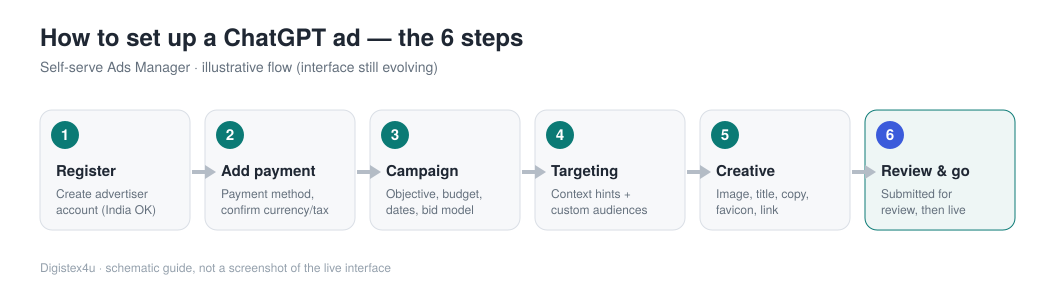
Step 1: Register as an advertiser
What you'll see: an advertiser sign-up for the Ads Manager, separate from your normal ChatGPT login. What to do: register your business and request access. Access is granted gradually, so you may not get in the same day. Sign up early even if your first campaign is weeks away. Indian businesses can register directly now; before 31 August that simply wasn't an option.
Step 2: Add a payment method
What you'll see: a billing screen that wants a payment method before anything can launch. What to do: add your method and read exactly what the screen says about currency and tax, which I cover in the billing section below. You set your own budget later, so no large deposit is gating you at this stage.
Step 3: Build the campaign
You're at the top of a three-level structure: campaign, then ad group, then ad. Set the right thing at the right level and the rest is straightforward; mix them up and you'll fight the tool the whole way.
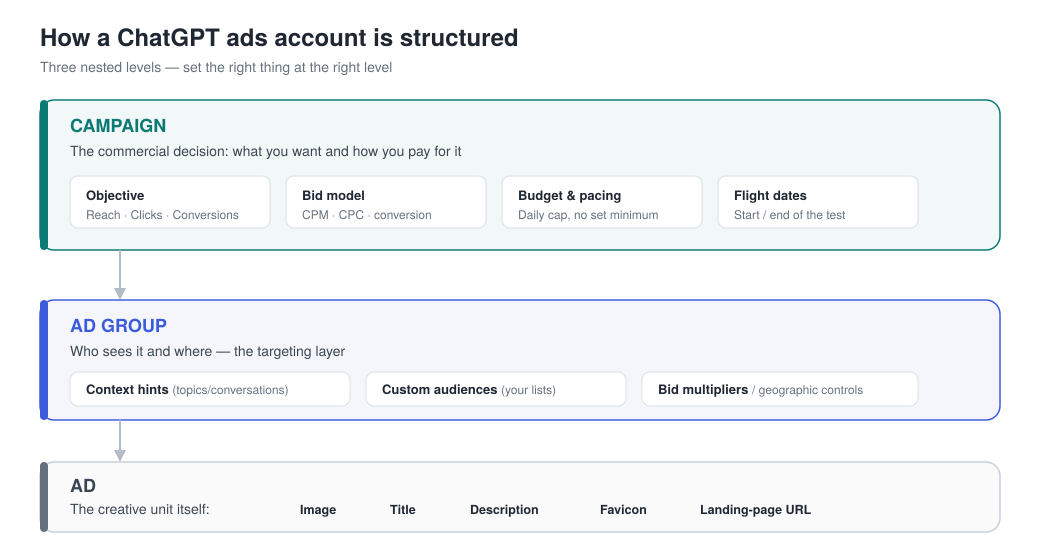
What you'll see: the three-stage wizard in the left rail — Create Campaign, then Create Ad Group & Ads, then Review. What to do: name the campaign, pick your objective and set your budget, so you always know which stage you're on before moving down a level.
Step 4: Set your targeting (ad group)
The ad group is where ChatGPT stops looking like Google, so it's worth slowing down here.
What you'll see: the ad-group form. What to do: name the group, choose a conversion type (the action you're optimising for, like a lead or a purchase), and pick a bid strategy — Maximize results, where the system sets bids against your budget, or Manual: Max bid once you have data to justify it. Set a default destination URL, and write your context hints: a plain description of the conversations, topics or keywords where your product belongs. These guide matching, but they aren't exact-match rules, so describe the intent, not a keyword list.
Step 5: Build the creative (ad)
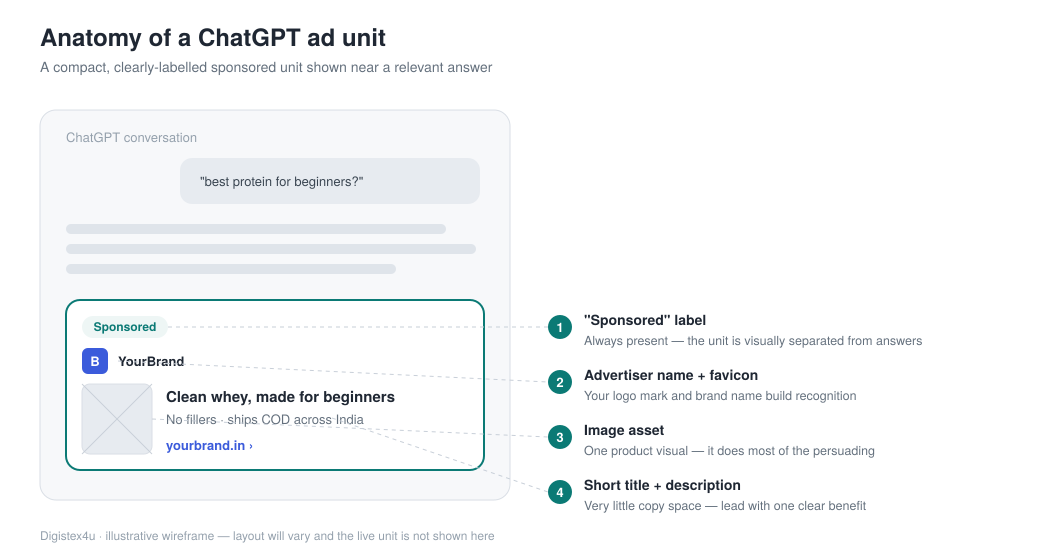
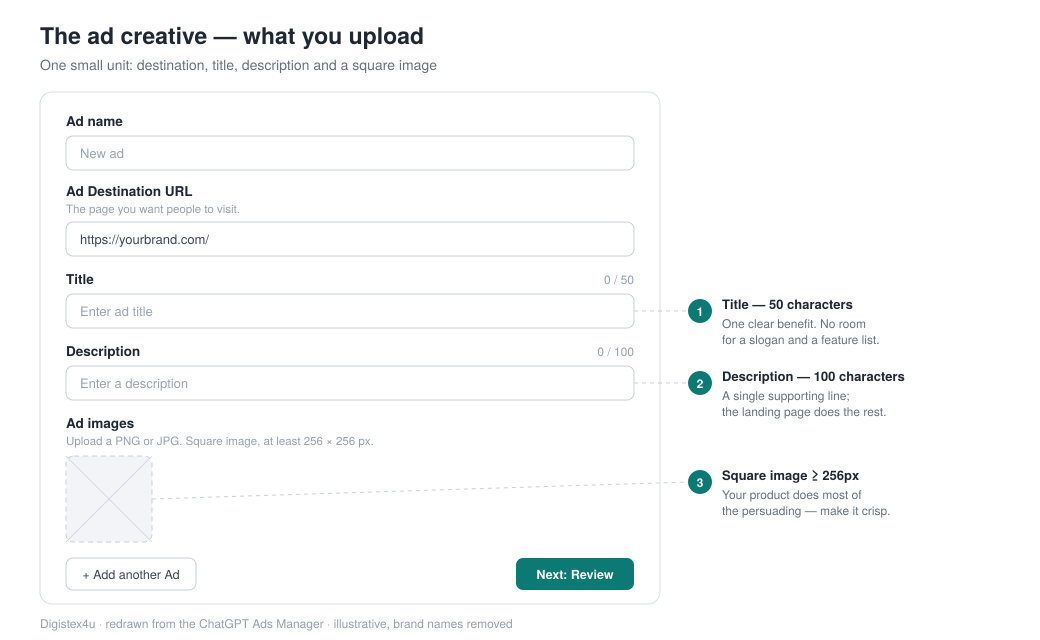
What you'll see: the ad form, alongside AI-generated ad suggestions you can accept, edit or ignore. What to do: set the destination URL, write a title of up to 50 characters and a description of up to 100, and upload a square image, at least 256 × 256px (PNG or JPG). That's the entire unit, so lead with one clear benefit and let the landing page carry the rest. You can stack several ads in one group with Add another Ad.
Step 6: Submit for review, then launch
What you'll see: a review status on the campaign. What to do: submit and wait, because every campaign is reviewed before it can serve. Build in a day or two of buffer before any launch tied to a sale or festive date, since "approved instantly" is not something OpenAI has promised.
How ChatGPT ads compare to Meta and Google
If you run performance for a D2C brand, the mental model matters more than the menu. Here's how the three levers compare.
| Lever | ChatGPT Ads | What it's closest to |
|---|---|---|
| Targeting | Conversation context hints plus custom audiences from your lists | Closer to contextual and audience buying than to Google keyword match |
| Bidding | CPM, CPC, or conversion-based, chosen by objective | Familiar if you've run Meta or Google, but the auction rewards relevance to the conversation |
| Creative | One small unit: a 50-char title, a 100-char description, a square image and a link | A compact native/text ad, not a full Meta creative canvas |
The practical takeaway: this is an intent-and-context channel. Someone asking ChatGPT for help choosing a product is a warmer moment than a cold scroll, but the unit is small and the copy space is tiny, so your image and your offer do the heavy lifting. Getting that mix right is exactly the kind of work that structured performance marketing exists to do, and it's worth treating ChatGPT as its own discipline rather than pasting in your Meta assets.
Payment and billing: what's confirmed, what isn't
Here the honest answer matters more than a confident one, because OpenAI has published less than you'd like.
What's confirmed
You add a payment method when you register, and you set your own budget. There is no stated minimum spend for self-serve, and the large minimum that gated the earlier managed pilot has been removed. You're charged according to your bid model, so a CPM campaign bills on impressions and a CPC campaign bills only when someone clicks.
What Indian advertisers should check at signup
OpenAI has not publicly detailed the India-specific billing mechanics: which currency you're billed in, how GST is applied, or how the payment sits with Indian card and e-mandate rules. Don't assume, and don't trust a third-party blog quoting exact card types. Add your payment method in the portal, read what the checkout actually says about currency and tax, and screenshot it for your finance team before you launch. If you run client accounts as an agency, sort out who is the billing entity, you or the brand, before the first campaign goes live.
Should your D2C brand test it yet?
Access opening is not the same as the channel being ready for your specific brand. A few honest filters.
A sensible first test
Test ChatGPT ads if your tracking is genuinely clean, you have a real custom-audience list to upload, and you can spare a small budget you won't miss while you learn an unfamiliar auction. Hold off if your Meta and Google accounts are still leaking money, because a new channel won't fix an old measurement problem, it'll just add another place to lose track of it.
Picture a mid-size supplements brand with a clean pixel and a list of 40,000 past buyers. It uploads that list as a custom audience, writes context hints around fitness and daily-routine conversations, runs a single CPC campaign pointing at one hero product, and caps the daily budget at a level it could lose without flinching. Two weeks later it has a real cost per acquisition to compare against its Meta prospecting, and a decision that's based on orders rather than on being early. That's the whole game: a contained test with a number at the end of it.
If you do test, ring-fence it. Run a small, self-contained campaign with its own budget and one clear conversion, give it a couple of weeks, and judge it on cost per acquisition and incremental orders, not on impressions or novelty. The brands that get value from ChatGPT ads early will be the ones that treated it as a measured experiment, kept their core channels protected, and let real sales data, not the excitement of a new platform, decide whether it earns a permanent line in the budget.
Frequently asked questions
Can Indian businesses advertise on ChatGPT now?
How much do ChatGPT ads cost to start?
What does a ChatGPT ad look like?
How do I pay for ChatGPT ads from India?
Ready to put this into action?
Digistex4u runs performance, CRM, CRO and growth as one engine for D2C brands. Book a free 20-minute call and we'll map your fastest path to scale.
Get the D2C growth playbook
One practical teardown a week — the Meta, Google, SEO, CRM and retention tactics we run on real D2C brands. No fluff, no spam.